Base64 vs URL encoding: what's the difference
Base64 and URL encoding both turn text into something safe to send, and they are easy to confuse, because both replace characters you cannot send as they are. But they solve different problems, and using the wrong one gives a result that looks right and behaves wrongly. This guide compares them side by side on the same text, explains when each one is the right choice, and shows where they overlap. Check the Base64 half of every example on the Base64 Encoder Decoder.
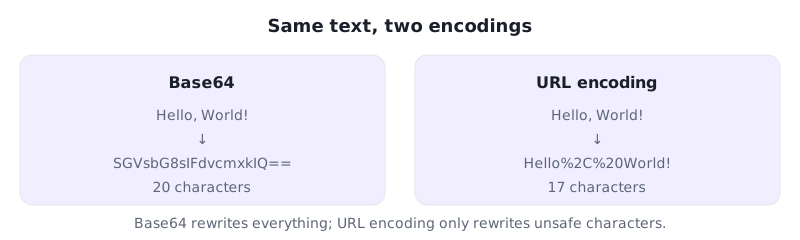
The same text, two results
Take the 13 letters of Hello, World! and encode them both ways. Base64 rewrites the whole thing: SGVsbG8sIFdvcmxkIQ==, which is 20 characters long, and none of the original letters survive. URL encoding is far gentler: it leaves the letters and the exclamation mark alone and only rewrites the comma and the space, giving Hello%2C%20World!, which is 17 characters long and still readable. The difference is the point. Base64 is a complete rewrite of the bytes; URL encoding is a patch that fixes only the characters that are unsafe in an address.
What each one is for
Base64 exists to carry binary data through a channel that only accepts text. A picture, a file or a block of bytes becomes a string of safe characters, and the price is that the output is about a third bigger and unreadable. URL encoding exists to make a piece of text safe inside a web address. It leaves ordinary letters alone and rewrites only the characters that have a special meaning in an address, such as the space, the question mark and the ampersand, as a percent sign followed by two hex digits. A space becomes %20, a comma becomes %2C, and a question mark becomes %3F. Use Base64 when the data is binary; use URL encoding when the data is text going into an address.
How the size compares
The two encodings grow the text by very different amounts. Base64 always grows it by about a third, because three bytes become four characters, whatever the content is: Hello, World! grows from 13 bytes to 20 characters. URL encoding grows it only by the unsafe characters it has to fix: the same text grows from 13 characters to 17, because only two characters needed rewriting. On a plain web address the difference is stark: https://example.com is 19 characters, and URL encoding leaves it exactly as it is, because every character in it is safe in an address, while Base64 turns it into aHR0cHM6Ly9leGFtcGxlLmNvbQ==, which is 28 characters of unreadable text. URL encoding is cheaper whenever the text is mostly safe already; Base64 is the only option when it is not text at all.
Where they overlap
The two encodings meet in one place: Base64 output that has to travel inside a web address. Standard Base64 uses plus and slash, and both are special in addresses, so the bytes FB FF FE encode to +//+ in standard Base64 but to -__- in the URL-safe variant, where plus becomes a minus and slash becomes an underscore. The URL-safe variant is still Base64 — it encodes and decodes the same way, with the same alphabet except for those two characters — but it is safe to paste into an address without further encoding. If you ever see a Base64 string with minus and underscore characters in it, that is what you are looking at, and decoding it with the standard alphabet will give the wrong bytes.
Which one to use
Choose by the job, not by habit. If you are sending a file, a picture or any binary data through a text-only channel, use Base64, because URL encoding cannot represent binary data at all. If you are putting a piece of text into a web address, use URL encoding, because it keeps the text readable and adds the least size. If you are putting Base64 output into a web address, use the URL-safe alphabet, so the plus and slash do not break the address. And never decode one with the other: feeding SGVsbG8sIFdvcmxkIQ== to a URL decoder gives you back the same string unchanged, because there is nothing in it for URL encoding to fix, while feeding Hello%2C%20World! to a Base64 decoder gives gibberish, because percent signs are not part of the Base64 alphabet.
Frequently asked questions
What is the difference between Base64 and URL encoding?
Base64 rewrites all bytes into 64 safe characters, so it can carry binary data but makes text unreadable. URL encoding only rewrites unsafe characters as % signs, so text stays readable.
Is Hello, World! the same in both encodings?
No. In Base64 it is SGVsbG8sIFdvcmxkIQ== (20 characters); in URL encoding it is Hello%2C%20World! (17 characters).
Can I put Base64 in a web address?
Use the URL-safe alphabet: + becomes - and / becomes _, so +//+ becomes -__-. Standard Base64 breaks addresses because + and / are special there.
Which encoding makes text bigger?
Base64, always by about a third. URL encoding only grows the text by the unsafe characters it rewrites, so safe text does not grow at all.
More guides on the Base64 Encoder Decoder
Try the Base64 Encoder Decoder — free, in your browser.